
Chicken Road was designed with mobile play in mind from the start. Its lane-by-lane structure translates naturally to a vertical phone screen, and because it's built on HTML5 rather than a heavier plugin-based format, it loads quickly even on mid-range devices and modest mobile connections. This page covers what to expect from the mobile experience and what separates a well-optimized casino app from a clunky one.
Browser Play vs Dedicated Apps
Most casinos that offer Chicken Road let you play it two ways: directly through a mobile browser with no installation required, or through the operator's own dedicated app (where one exists) available for iOS and Android. The underlying game — RNG, RTP, and rules — is identical either way; the difference is purely about interface convenience, login persistence, and whether you want a home-screen icon versus a bookmark.
Browser play has the advantage of working on any device without using storage space, and it's the only option for casinos that haven't built a native app. Dedicated apps can offer smoother navigation, push notifications for promotions, and sometimes biometric login, but they require enough phone storage and are only available where the casino has published one for your device's platform.
| Aspect | Browser Play | Dedicated App |
|---|---|---|
| Installation | None required | Requires download and storage |
| Game logic, RNG & RTP | Identical | Identical |
| Login persistence | Session-based | Often biometric or saved login |
| Promo notifications | No | Push notifications possible |
| Availability | Any device with a browser | Only where published for your platform |
What Good Mobile Optimization Looks Like
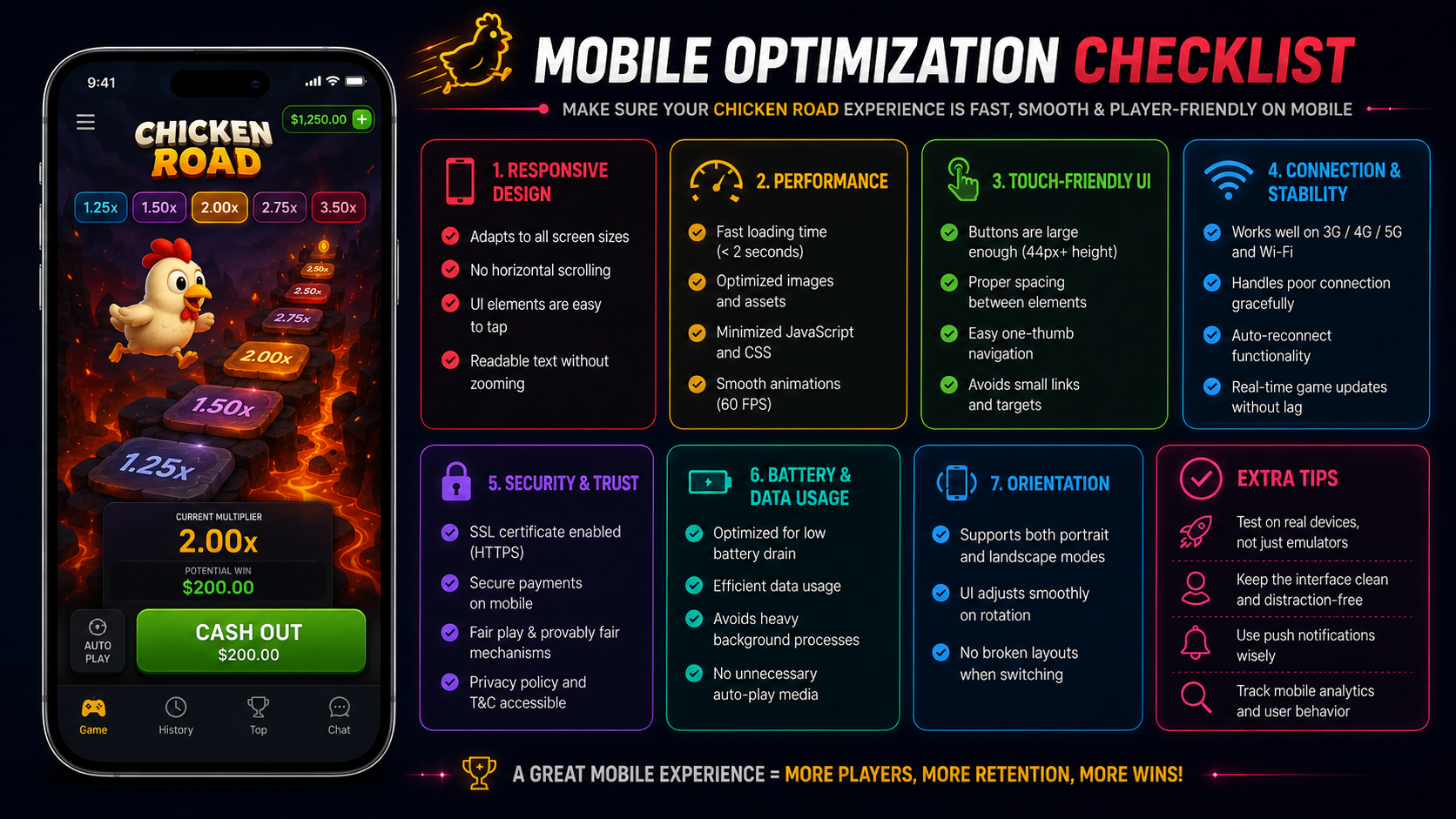
Not every mobile implementation of Chicken Road is equally polished. When judging a casino's mobile experience, a few things stand out:
- Load time — the game should be playable within a few seconds on an average mobile connection, without a lengthy asset download each session.
- Tap target size — the cash-out button in particular needs to be large and unambiguous; a mistimed tap in a fast-paced round is a common source of frustration on poorly adapted mobile layouts.
- Orientation handling — most implementations default to portrait mode, which suits the lane layout, but should handle rotation gracefully if a player switches to landscape.
- Stability during peak hours — some mobile sites slow down or lag during high-traffic periods; a well-provisioned casino keeps the game responsive regardless of concurrent player volume.
- Consistent account sync — balance, bonus status, and history should match exactly between desktop and mobile sessions on the same account.
Casinos With Strong Mobile Experiences
Based on app store ratings, load-time consistency, and interface polish at the time of writing, the following operators stand out for mobile-specific Chicken Road play. As with any operator, confirm current licensing for your region before creating an account — this is informational only, not a recommendation to deposit.
Lucky Hop Casino
Its Android and iOS apps mirror the desktop game library closely, with fast load times reported consistently across mid-range devices.
NeonBet Casino
No dedicated app, but its mobile site is well optimized with large tap targets and minimal load lag, making it a solid option for players who prefer not to install anything.
Rapid Wins Casino
Balance, bonus progress, and game history stay consistent across devices without needing to refresh or re-log in when switching from desktop to mobile.
Data and Battery Considerations
HTML5 crash games are generally light on both data usage and battery drain compared to graphics-heavy mobile games, since the animation is simple and doesn't rely on continuous high-frame-rate 3D rendering. Extended sessions on an older device can still produce noticeable battery drain over an hour or more, so it's worth keeping an eye on device temperature and battery percentage during long play sessions, the same as with any other mobile app.
Tablet vs Phone: Does Screen Size Matter?
Because Chicken Road runs on the same HTML5 codebase regardless of device, a tablet doesn't change the odds, the RTP, or the RNG in any way — the game logic is identical to what runs on a phone or a desktop browser. What does change is presentation: a tablet's larger screen makes the road, the lane markers, and the current multiplier easier to read at a glance, which some players find reduces the chance of a mistimed tap on the cash-out button during a fast-moving round. Phones remain the more common choice simply because they're the device already in hand, not because they offer any functional advantage for this specific game.
One practical difference worth noting: tablets are more likely to be shared devices in a household, so if you play on one, make sure you're logged out of any casino account when you're done, the same way you would with any other financial app on a shared device.
Accessibility Features Worth Checking For
Mobile accessibility isn't a universal feature across every casino's implementation of Chicken Road, but a few things are worth looking for if they matter to you:
- Adjustable UI scale or font size — some mobile clients let you enlarge the multiplier display and cash-out button beyond the default size, which helps on smaller screens or for players with low vision.
- Colorblind-friendly indicators — safe versus unsafe lanes are sometimes distinguished mainly by color; a well-built implementation pairs color with a shape or icon cue as well.
- One-handed play layout — a cash-out button placed within comfortable thumb reach on a large phone screen makes a real difference during fast-paced rounds.
- Reduced-motion options — a setting to tone down animation can help players sensitive to fast visual movement, though not every casino offers this for crash-style games yet.
None of these features change the underlying game math, but they materially affect how comfortable and error-free a mobile session feels, particularly during longer play.
A Practical Checklist Before Playing on Mobile
- Confirm the operator is licensed for your country before creating an account on any device.
- Test the demo mode, where available, on your specific phone before wagering real money, to check load time and tap responsiveness.
- Keep your mobile browser or casino app updated to the latest version for security and compatibility.
- Use a stable Wi-Fi or strong mobile data connection — a dropped connection mid-round is handled differently by different operators, so check the casino's help section for its disconnection policy.